Deal research and authorized-store price data
Use /gameprices, /lowestprice, /pricehistory, /bundles, and /gamecompare to investigate offers from supported, authorized retailers. Results vary by region and API availability.
Discover the latest gaming and community utilities added to Game DataBase, plus where to find their commands in Discord.
These are implemented features in the current v4.7.1 codebase. Third-party integrations may require credentials or be temporarily unavailable, and ongoing notifications require their respective settings to be enabled.
Use /gameprices, /lowestprice, /pricehistory, /bundles, and /gamecompare to investigate offers from supported, authorized retailers. Results vary by region and API availability.
/dealwatch sets an optional target-price DM alert across eligible authorized stores; /dealwatchlist and /dealunwatch manage the watch list. Original Steam watches still exist.
/freegames, /endingsoon, /dailydeals, and /randomgame surface information from recent Game DataBase discoveries, without requiring a separate browser tab.
Create expiring LFG posts with /lfgcreate, join with /lfgjoin, and vote on the next game through /gamepoll and /gamevote.
Track titles with /backlogadd and /backlogupdate; managers can select a price lookup /region and mute game-title keywords in giveaway alerts.
Check a creator with /twitchlive, configure live alerts, or look up upcoming releases with /releases. These commands need official Twitch/IGDB API credentials.
New /serverstats command group creates customizable counter channels for server membership, channels, roles and more. Eight subcommands keep setup and cleanup simple.
Game DataBase uses local SQLite for community settings and features; Cloudflare KV is reserved for its bot heartbeat. External queries are cached and rate-limited where supported.
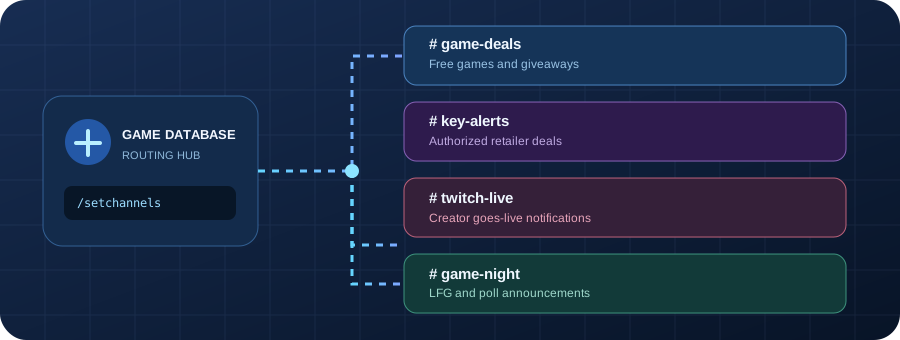
For new servers, use /setupguide and /setchannels. To turn on statistics, use /serverstats setup. External API results and server counts can change or lag behind live values. Do not advertise the optional Twitch or IGDB functions as always available unless you've configured and verified their credentials.